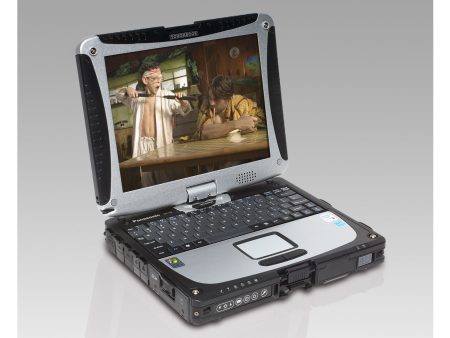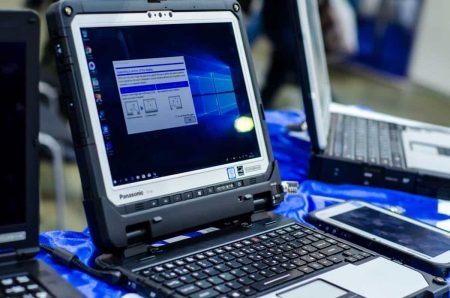

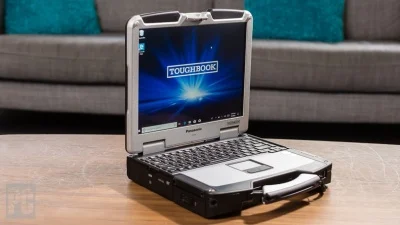
Newer computers offer faster processors and recent features, but not every field operation needs the latest hardware. Some organizations place greater value on physical durability, familiar connections, and compatibility with established software. A panasonic toughbook cf 31 laptop can remain a practical choice for certain mobile teams, industrial settings, and vehicle-based workstations when the selected configuration meets the required workload.
Rugged Construction for Demanding Locations
Consumer laptops are generally designed for offices, homes, and other controlled environments. They may not withstand repeated vibration, exposure to dust, minor drops, or frequent movement between vehicles and worksites.
The CF-31 belongs to Panasonic’s fully rugged computer line. Its reinforced construction was created for working conditions where physical protection matters as much as processing performance. This can make the model relevant to transportation, public safety, utilities, manufacturing, construction, and equipment maintenance.
However, the word “rugged” should not replace proper product assessment. Buyers should review the specifications of the individual unit and compare them with the conditions employees encounter during a normal shift.
Where the CF-31 May Still Make Sense
An older rugged computer can be useful when employees rely on a limited set of established applications. Examples may include service documentation, fleet records, equipment diagnostics, inspection forms, inventory systems, and locally installed business programs.
The CF-31 may also suit vehicle-based roles in which a laptop remains connected to a dock for much of the day. A fixed mobile workstation can provide employees with access to job information while protecting the computer from unnecessary movement.
Organizations should define the job before selecting the hardware. A device that works well for basic reporting and equipment diagnostics may not be suitable for demanding design programs, large visual files, or current software with high system requirements.
Compatibility With Legacy Software
Some industries still use specialized applications that were developed for older operating systems. Replacing the computer may require replacing or reconfiguring the software, attached equipment, and employee procedures as well.
A CF-31 may help an organization maintain an existing workflow when the required program is compatible with the selected operating system. It may also support equipment that relies on physical connections no longer found on many slim consumer laptops.
Continuing to use older software requires careful security planning. IT teams should confirm whether the operating system still receives appropriate support and whether the device can comply with company security requirements. Computers that cannot be adequately protected should not be connected to sensitive systems.
Select the Right Hardware Configuration
CF-31 units can differ in processor, memory, storage, operating system, wireless hardware, and physical condition. Buyers should not assume that every unit offers the same performance.
Start by reviewing the minimum and recommended requirements of the software employees use. Memory should be sufficient for normal multitasking, while storage should accommodate applications, local records, photos, maps, and offline documents.
A solid-state drive may provide faster startup and application loading than an older mechanical drive. Buyers should confirm the installed storage type and capacity rather than relying solely on the model name.
Review Display and Input Requirements
Field employees may need to use their computers in direct sunlight, inside vehicles, at night, or while wearing gloves. Screen brightness and input support can therefore influence productivity.
When comparing units, buyers should check the display condition, touchscreen functionality, keyboard condition, and any included stylus. The screen should be examined for scratches, pressure marks, dead pixels, and areas with uneven brightness.
A backlit keyboard may help employees working in low-light conditions. Touch input can be valuable for forms and navigation, but it should be tested before deployment to confirm that it responds correctly.
Confirm Ports and Connectivity
One reason organizations continue using older rugged computers is access to ports required by specialized equipment. Diagnostic tools, scanners, printers, measurement devices, and vehicle systems may depend on connections that are uncommon on recent consumer laptops.
Create a full list of necessary ports before placing an order. Buyers should also verify Wi-Fi, Bluetooth, GPS, cellular, Ethernet, and antenna requirements where applicable.
Wireless capabilities can vary between configurations. Older cellular hardware may not support current carrier networks, so its compatibility should be confirmed before purchase. An external modem or another communication method may be required.
Check Battery Condition
Battery health is an important consideration when purchasing an older computer. A used battery may hold less charge than it did when new, even if the laptop itself works correctly.
Ask whether the battery has been tested and whether replacement options are available. Employees working from vehicles may rely on a compatible charger or powered dock, while employees working away from power may need a replacement or spare battery.
Battery expectations should be based on current condition and real work patterns rather than original manufacturer estimates.
Evaluate Refurbished Units Carefully
A refurbished rugged laptop should be evaluated as a complete working system. Buyers should review cosmetic condition, tested functions, included accessories, operating system, battery status, warranty coverage, and return terms.
It is also helpful to confirm whether memory and storage upgrades are available. A lower-priced unit may require additional spending before it is ready for deployment.
The CF-31 will not be the right computer for every organization. Businesses running recent software or planning long deployment cycles may be better served by a newer model. However, a carefully selected unit can support established field applications while providing the physical protection required in demanding settings.
Businesses ready to compare CF-31 configurations, replacement components, docks, chargers, and other rugged computing options can visit Tough Rugged Laptops to identify a system that fits their equipment, working conditions, and budget.